
Introduction
This post documents my custom Gitea Pages stack – a privacy-friendly alternative to GitHub Pages. With GT-RUNNER, the Codeberg Pages server, and Traefik as a reverse proxy, I’ve built a self-managed hosting stack that fully automates domain management, TLS certificates, and deployment – without centralized dependencies and with complete control.
Architecture Overview
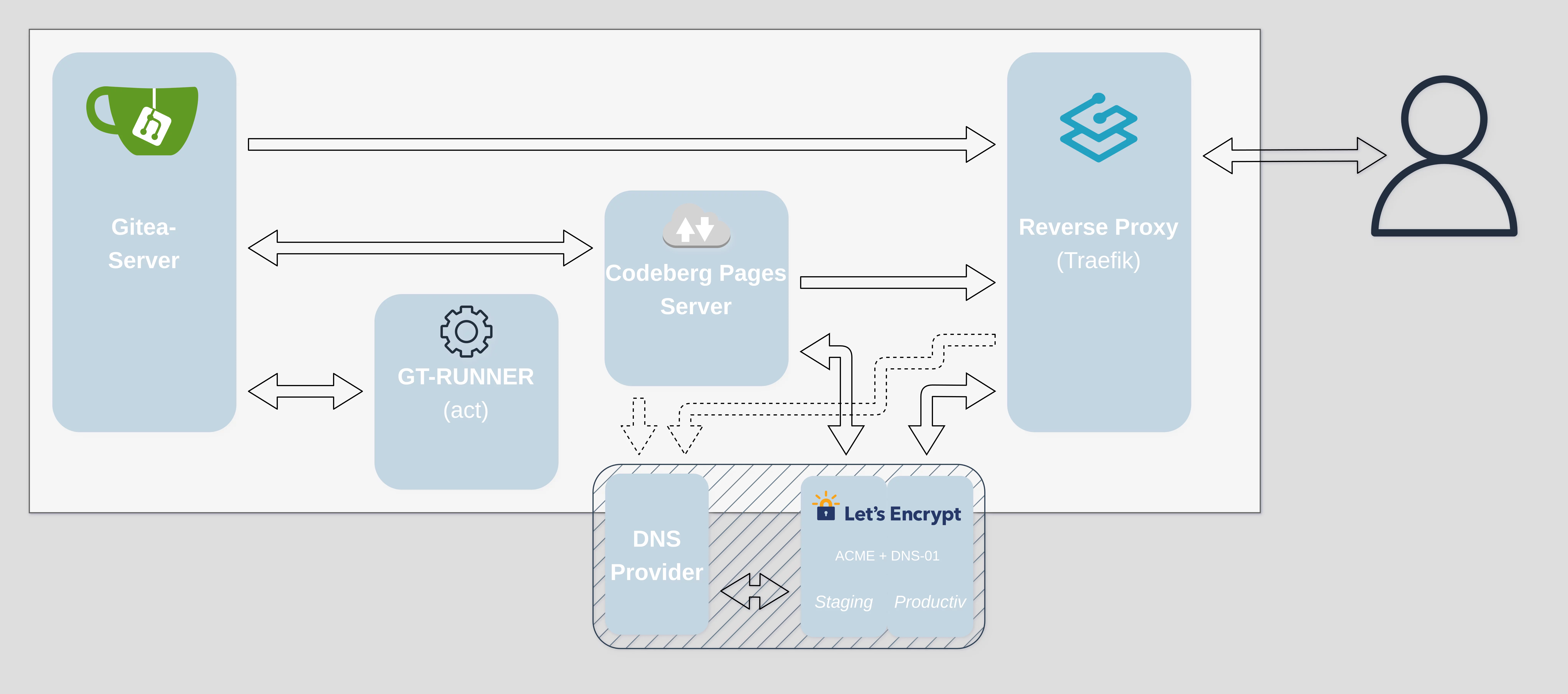
The following diagram shows the structure of my stack. All core components – Gitea, the runner, the Pages server, and the reverse proxy – are connected within a private network. TLS certificates are issued in two stages using Let’s Encrypt (Staging internally, Production externally):
Detailed Functionality
To be honest: at its core, it’s just a normal Git server. Gitea runs internally, and the GT-RUNNER is connected – based on act with a fairly large image that provides everything GitHub Actions does. For my use case, that’s more than compatible enough.
Next is the Codeberg Pages server – also internal. It communicates with Gitea via API, just as intended. Important: everything Gitea, the runner, and the Pages server do happens strictly inside the private network. Nothing leaks outside. That was important to me.
Now about TLS: the Pages server can’t operate without certificates. So it gets them – in the standard way via my DNS provider, through its API and the ACME protocol. But only using Let’s Encrypt’s staging certificates. Why? Because that’s enough. This is about internal TLS, not external trust.
Once the Pages server has its certs, it can serve content cleanly – internally, over HTTPS, with a proper structure. My reverse proxy (Traefik) takes care of the rest.
Traefik is configured to not care whether the internal cert is trusted. It terminates TLS on the public side, fetches valid production certificates via DNS-01 and Let’s Encrypt, and rewrites the domain paths accordingly.
To make this work, I rewrite the requests. For example, Traefik receives something like home.pagessub.0xmax42.io, extracts which repository it’s supposed to serve, and rewrites the request internally to user.pagessub.0xmax42.io/repo/. This lets the Pages server route the request correctly.
From the outside, everything looks just like GitHub Pages – every subdomain serves its own static project. But this time: privacy-friendly, self-hosted, and with no vendor lock-in.
Outlook
In the long term, I want repositories to define their own deployment domains – e.g. via a .traffic file. The Gitea API could then automatically generate the corresponding Traefik config and hand it off. The goal: a fully automated, self-healing static web hosting stack.
Components Used
- 🧃 Gitea – Self-hosted Git service
- 🌀 Traefik – Reverse proxy with ACME support
- 📦 Codeberg Pages Server – Static pages server
- 🔀 traefik-subdomain-path-rewrite-plugin – For dynamic URL rewriting based on subdomains
- 🔐 Let’s Encrypt – Free TLS certificate management via ACME
- 🐳 Docker – Containerization of all components for easy management and isolation
📁 This setup is part of my infrastructure foundation for 0xMax42.io. More posts to follow.